
If the display says 55, that means the air in the room is about 55% humid. When you choose a setting such as 45, you are choosing the humidity level you want the room to reach. Lowering the setting makes the dehumidifier remove more moisture before it stops.
Table of Contents
Quick Answer: The Number Is Relative Humidity
The main number on a dehumidifier is the relative humidity percentage inside the room.
Relative humidity is usually shown as a percentage. A display reading of 55, for example, means the room is at about 55% relative humidity.
When you select a number on the controls, you are normally setting the target humidity. The dehumidifier works toward that number and can shut off or pause when the target is reached.
Current Humidity vs. Target Humidity
Depending on the model, the display or controls may show the current humidity in the room, the target humidity setting, or both.
| Number | What It Means |
|---|---|
| Current humidity | The relative humidity the dehumidifier senses in the room right now. |
| Target humidity | The humidity level you are asking the dehumidifier to work toward. |
For example, if the room is at 60% and you set the dehumidifier to 45%, the unit should continue removing moisture because the room is still above the selected target.
Once the room gets close to the target humidity, the dehumidifier can shut off or pause automatically.
What Number Should You Set a Dehumidifier To?
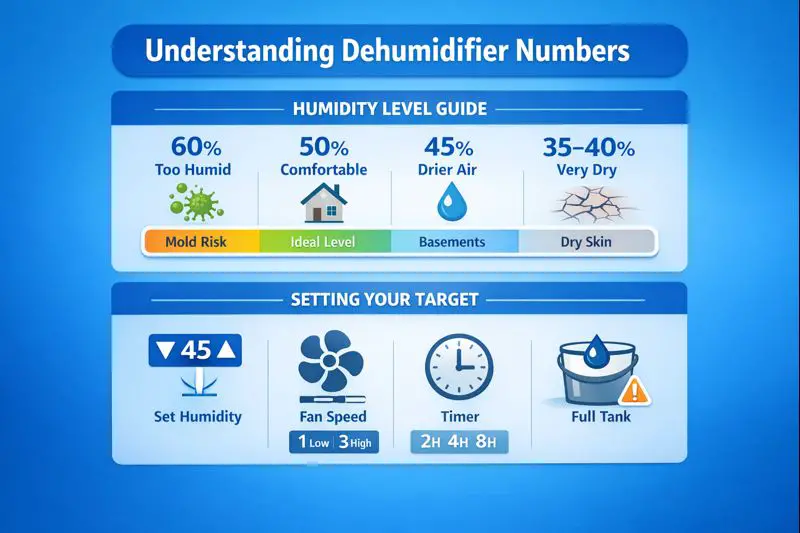
The existing guidance on this page uses 40% to 60% relative humidity as the general working range for indoor humidity.
| Setting | What It Means |
|---|---|
| 60% | On the humid side and worth monitoring if the room stays there. |
| 50% | A comfortable setting for many homes. |
| 45% | A practical target for moisture control. |
| 35–40% | On the dry side. |
If you want the dehumidifier to remove more moisture, lower the target number. If the room is becoming drier than you want, raise the target number.
If you are specifically trying to understand a reading of 60% or higher, see our guide to 60% humidity in the house.
What Happens When You Raise or Lower the Setting?
Lowering the number tells the dehumidifier to keep removing moisture longer.
For example, if the room is at 55% and the target is 45%, the dehumidifier should continue running until the humidity gets closer to the selected target.
Raising the number lets the dehumidifier stop at a higher humidity level.
If the room is at 55% and the target is set to 60%, the unit may not need to run because the room is already below that target.
Think of the humidity setting as the stopping point. You are not choosing how powerful the dehumidifier is. You are choosing the humidity level you want it to work toward.
Common Dehumidifier Symbols and Controls
Dehumidifier controls vary by brand and model, but many machines use similar buttons and symbols.
| Control or Symbol | What It Usually Means |
|---|---|
| ▲ / ▼ Arrows | Raise or lower the target humidity setting, often in 5% steps. |
| Fan Speed | Controls airflow speed rather than the target humidity. |
| Timer | Allows the unit to operate for a selected period of time. |
| Bucket or Water Drop | May indicate that the water tank is full or not seated correctly. |
| Continuous or CO Mode | On models that use this setting, the dehumidifier runs continuously instead of stopping at a selected humidity target. |
| Auto or Comfort Mode | Allows the unit to control some settings automatically. |
| Sleep Mode | Usually reduces fan speed or noise for quieter operation. |
| Snowflake or Defrost | Relates to cold operating conditions and frost on the coils. |
| Filter Indicator | Indicates that the filter may need to be checked or replaced. |
| Power Button | Turns the dehumidifier on and off. |
| Reset Button | May be used after some error codes or unexpected shutdowns. |
| Drain or Hose Connection | Allows water to drain continuously through a hose instead of collecting only in the bucket. |
When the Number or Setting Does Not Behave as Expected
If your dehumidifier keeps running, check the selected target humidity first. A lower target gives the machine more moisture to remove before it can stop.
If the machine stops sooner than expected, the target may be set higher than the current humidity in the room.
If the bucket light is on, check whether the tank needs to be emptied or pushed fully back into place.
If the display shows a continuous mode such as CO, the machine may continue operating instead of stopping at the selected humidity target.
If a snowflake or defrost indicator appears, cold operating conditions may be causing frost to form on the coils.
If the humidity remains high even after the dehumidifier has been running for a long time, the room may still be taking on moisture or the machine may not be keeping up with the amount of moisture entering the space.
An open window can also make it harder for a dehumidifier to reach its target. See Can You Run a Dehumidifier With the Window Open? for more on that situation.
Related Dehumidifier Questions
The following topics are related to dehumidifiers, but they are better handled in their own guides rather than turning this page into a general dehumidifier FAQ.
- Trying to decide whether you need to add or remove humidity? Read Humidifier vs. Dehumidifier.
- Comparing moisture control with air filtration? Read Air Purifier vs. Dehumidifier.
- Looking for the dehumidifier or dry setting on an air conditioner? Read AC Dehumidifier/Dry Mode.